Stage 2 – making sense of the chaos
How a batch script and a continuous scanner pulled years of decks, notes and blog posts into one searchable system.
Ben Rees - 20 April 2025

This is the part where all the content sources came together into a centralized system I could actually interact with.
This post is a cleaned-up record of what I built, what worked, what didn’t, and what I planned next. If you've ever tried to unify fragmented notes, decks, blogs, and structured documents into a searchable system, this might resonate :)
What I Built
There were two main components at the heart of the system:
- Batch Processing Script
PopulateChatSystemDataRepository.py— this was run manually to gather and format all source data into a single repository. My plan was to automate it later. - Continuous Scanner
A lightweight background service monitored for new blog posts and updates.
At that point, the batch script did the heavy lifting, though I intended to shift it onto Google Cloud Run to handle scale.
Where the Data Lived
The sources I processed included:
- PowerPoint files
These were manually selected and hardcoded into the script — a reasonable tradeoff given how few I needed to track. - RSS Feeds
- My blog at bjrees.com
- A few curated industry insight feeds
- OneNote Notebooks , such as:
- Project documentation (e.g. Skynet , The Oracle)
- Notes from a Cambridge Judge Business School programme
- Third-party and personal research logs
- iCloud Backups
These contained archived slide decks and supporting materials.
All of this data was funneled into a staging area for eventual vector embedding and retrieval.
Microsoft Graph API + OneNote
To pull content from OneNote , I used the Microsoft Graph API. First, I installed the required libraries:
pip install msal requests
msalhandled authentication via Azure Active Directoryrequestsallowed me to interact with the Graph API endpoints
Once I authenticated, I could enumerate and query notebooks like this:
python ExtractNotes.py
After logging in via a Microsoft-generated URL, I could successfully extract content from all the notebooks I needed.
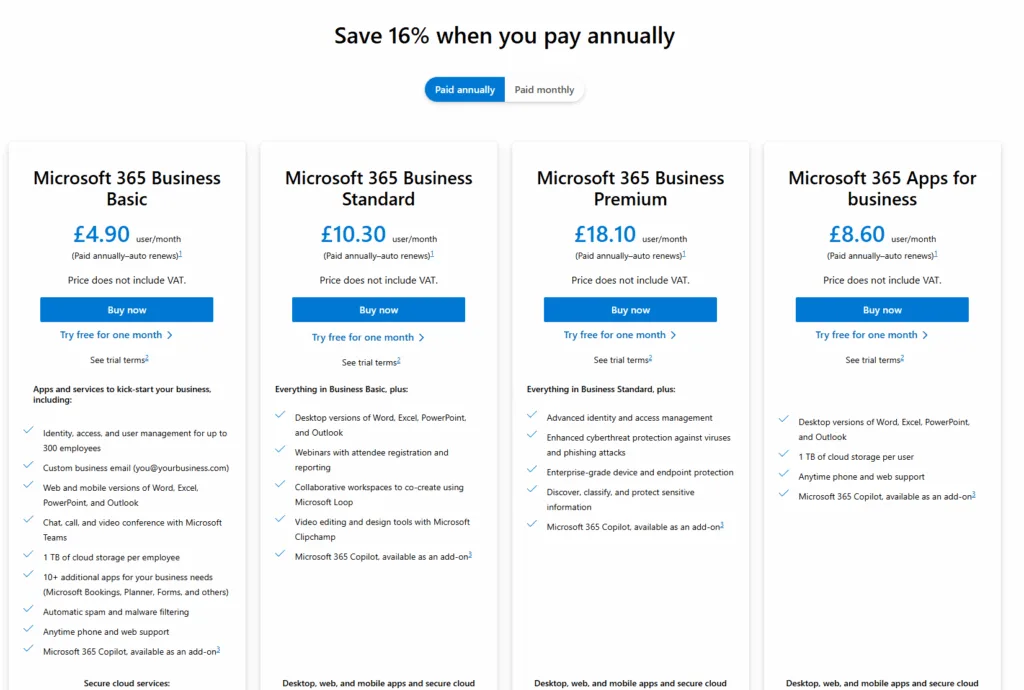
Licensing Curveballs
At the time, I hit a snag: my Microsoft 365 Family plan didn’t include SharePoint Online, which was required to query OneNote via the Graph API.
I weighed my options:
- Pay for a Business Standard plan (~£9.40/month)
- Try and use my home license in some way, even thought it didn't seem to have what I needed for OneNote
I went with option 2, supported by a one-month free trial of Microsoft Business Basic to help validate the approach.
Google Sheets as the Backbone
The ingestion script used a JSON keyfile to interact with Google Sheets. It opened the sheet like this:
client.open_by_key(sheet_id).sheet1
Sheets acted as a live database — but I ran into 429 rate-limit errors , especially when repeatedly reading the same files. To solve this, I built a basic checkpointing system so the script would:
- Cache previously processed records
- Avoid re-downloading the same content every time
- Track progress and only fetch new entries on each run
The GitHub Reset
After a short break from the project, I realized the codebase had grown too complex. I had introduced a lot of logic to deal with throttling and retries, but it made everything harder to understand.
So I rolled back to a much earlier commit and started again from a simpler foundation.
It was the right move.
What Came Next
Here’s what I tackled after that cleanup:
- Migrated the whole project to an old home laptop
- Simplified the ingestion pipeline
- Ensured each run processed only new data , not the full archive
- Finalized access and querying via Microsoft Graph API for OneNote and SharePoint content
Reflections
Skynet began as a chatbot experiment, but evolved into something bigger — a contextual knowledge system that drew from years of notes, presentations, and personal writing.
Stage 2 was about turning chaos into structure. The next phase was even more exciting: embeddings, retrieval, and building a system that could answer real questions, grounded in my own work.
Read Stage 1 if you missed the start.
My AI visibility went from zero to 26% in six weeks. The one category still at zero is the one this post is about.
Six weeks after publishing a zero-appearance rate across every AI platform, most categories moved. The one still at zero is AI Search Visibility itself.
A Weighted Sum of Everything Ever Written About You
What Bayesian linear regression, copied by hand from a textbook I've owned since January 2007, tells us about getting cited by AI.
Your brand doesn't get its own space inside an AI model
Language models pack far more concepts than they have space for, a phenomenon called superposition. Generic content competes for that same overcrowded space as everyone else's, and usually loses.
I am invisible on every AI platform. Here is the data.
For ten weeks I ran an AI visibility measurement system across ChatGPT, Gemini, Copilot, and Perplexity. My appearance rate for non-branded queries is zero. Here is what the data actually shows.